Posts

My Animoto

I made this animoto for our Student Council fundraiser for an orphanage in Africa. These are actual pictures taken by AJ when he was in Africa this past summer. My student council members really liked this video.

5th Session Reflection

Today we talked about digital storytelling. I have used animoto a lot in my classroom. In social studies class, the students get to decide what format they want their projects to be. Many of them choose to do an animoto. I have heard the kids say how easy it is to use. The only draw back I think is that it limits the text that can be added to a picture. Today Amy said that she didn't see that as a draw back but as a reason that kids need to really think about what pictures they are putting on their animoto. I never really saw it that way. We also talked about and played around with VoiceThread. I have played around with it before but not really in depth. I thought that I could use VoiceThread with my history class by uploading a picture from the Civil War and have the kids record a historical fiction story that they create.

Twelve Essentials for Technology Integration article

This article was very interesting. There are so many applications out there that are free to use. I first looked at SchoolTube because I enjoy showing short video clips in class but I have found that YouTube can not always be reliable and when you search for a video some other videos pop up that have bad words in their title. I knew of TeacherTube but I have not really explored SchoolTube. I think it is great to have a place where kids can publish their work in a safe environment. The second one I looked at was SnagFilms. I have never heard of this website before. I really liked it. Personally, I really enjoy documentaries, but I can see myself using this in my history class as well. For example, they have documentaries about legacies of different decades. The third one I looked at was Weebly. It looks like an easy way to make a free website/blog. I watched the tutorial and it all seemed pretty user friendly. I don't really know when I would use this in class. I already have a Mood...
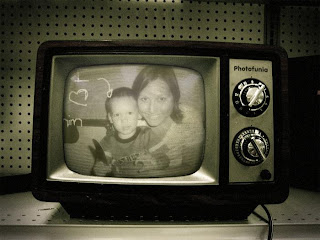
Having fun with photos

Image
I looked at Flickr, Picnik, Picasa, and PhotoFunia. I already have a flickr account and I have kept some photos there. I found PhotoFunia to be a lot of fun. I feel like I could have a lot of fun with this program in class. My students could use this to change a picture of themselves and then write about the history of the picture. This would include creative writing. I took a few pictures and I really enjoyed changing them and making them look cool. Here they is a picture of me and my nephew.

Reflection on 3rd Class

We started talking about classroom management and tools. I noticed that there was a website listed www.online-stopwatch.com that I already use. My students use this in Forensics class often. When the kids work on practicing their speeches, they use this as a tool. I like it because you can choose to either use it as a stop watch or have a countdown. I thought the polleverywhere.com was a really fun tool and I could see myself using this in my classroom. There are so many things that you could ask in a poll. Off the top of my head, I could ask who the most influential United States President is. It would be interesting to see who the students select and that could lead into a class discussion. I also looked at Primary Pad with Lisa. I thought this was a cool tool because you could see who added what to each document. They highlight each author’s additions in a different color. Then I got to look at Voki.com. This was a fun site to record my voice with an avatar saying it. I can see...

My Search Story

I had a pretty stressful day because of the middle school musical that I am a part of. So to de-stress I played around with Youtube search stories. It was really easy to use and it did make me feel better. Enjoy!

Reflection on 2nd Class

I have known about wikis for awhile but I have never used one in my classroom. I can see how to use one. I teach social studies for 8 th graders and we do a lot of projects. I have trouble anytime I have kids do a group project because of attendance issues or if groups need to meet outside of class. I can see how wikis can solve some of these headaches. I created a diigo account today. I decided to go with diigo instead of delicious because delicious needed me to create a yahoo email account and I already have five email accounts and I do not want to add anymore than I have to. I can see myself using this tool because I have two different laptops that I use consistently. Now I can see my "favorites" at either computer. I can see how I can use this in class. I can bookmark certain sites that are credible that I would like my students use for projects or research. I also learned what RSS meant (really simple syndication). I knew very little about RSS but now I realize how...